# Weechat-Tmux
Recently I have been to pycon-india (will blog about that too!) there [Sayan](https://twitter.com/yudocaa) and [Vivek](https://www.facebook.com/vivekanand1101?fref=ts) introduced me to weechat which is a terminal based IRC client, from the time I saw Sayan’s weechat configuration I was hooked to it.
The same night I started configuring my weechat , it’s such a beautiful IRC client I was regretting why did I not use it before. It just transforms your terminal into IRC window.
For fedora you need to do:
`sudo dnf install weechat`
Some of the configuration and plugins you need are :
1. [buffer](https://weechat.org/scripts/source/buffers.pl.html/)
2. [notify-send](https://weechat.org/scripts/source/beep.pl.html/)
That’s pretty much it but that doesn’t stop there you can make that client little more aesthetic. You can set weechat by using their [documentation](https://weechat.org/files/doc/devel/weechat_quickstart.en.html).
The clean design kind of makes you feel happy, plus adding plugin is not at all a pain. In the weechat window you just say `/script install buffer.pl` and it just installs it in no time. There are various external plugin in case you want to use them and writing plugin is actually fun , I have not tried that yet.
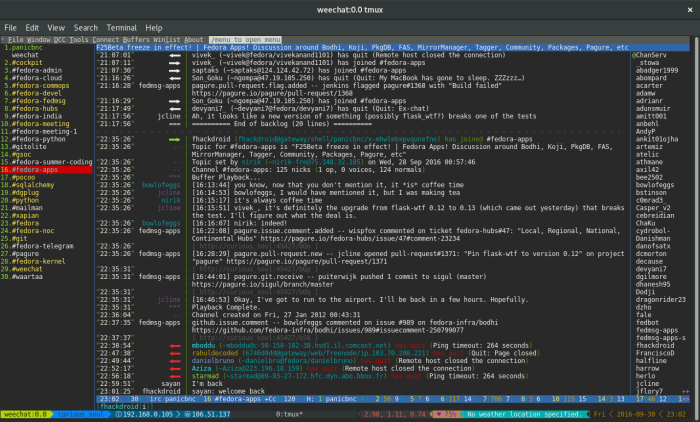
I also use to use bigger font but now I find this size more soothing to eyes. It is because of weechat I got to know or explore about this beautiful tool called `tmux` , because on normal terminal screen `weechat` lags , what I mean by lag is the keystroke somehow reach after like 5-6 seconds which makes the user experience go bad. I pinged people on IRC in `#weechat` channel with the query the community is amazing they helped me to set it up and use it efficiently , they only told me to use `tmux` or `screen` . With tmux my session are persistent and without any lag.
To install tmux on fedora:
`sudo install tmux`
`tmux` is a terminal multiplexer which means it can extend one terminal screen into many screen . I got to learn a lot of concepts in tmux like `session`, `pane` and `windows`. Once you know these things in `tmux` its really a funride. Some of the blogs I went through for configuring and using `tmux` the best I found was [hamvoke](http://) , the whole series is pretty amazing . So basically my workflow goes for every project I am working on I have a `tmux` session named after it, which is done by the command:
`tmux new-session -s `
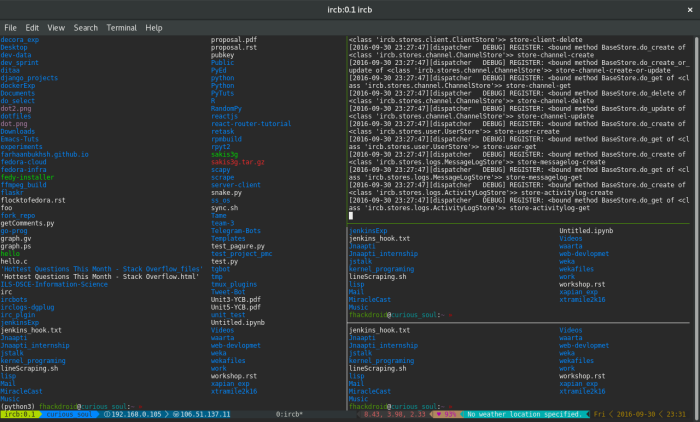
Switching between two session can be done by `attach` and `detach`. And I have one constant session running of `weechat`. I thought I have explored every thing in tmux but that can’t be it , I came to know that there is a `[powerline](http://)` for `tmux` too. That makes it way more amazing so this is how a typical `tmux` session with `powerline` looks like.
I am kind of loving the new setup and enjoying it. I am also constantly using `tmux cheatsheet`  because it’s good to look up what else you can do and also I saw various screencast on youtube where `tmux+vim` makes things amazing.
Do let me know how you like my setup or how you use it .
Till then, Happy Hacking! 